



Blocking on OnlyFans isn't just a way to get someone off your page. It decides who can see your content, who can message you, and who can keep paying you. Set up a written policy with clear rules for when to block and when to escalate, and it becomes one of your better tools for protecting your income and your peace of mind.
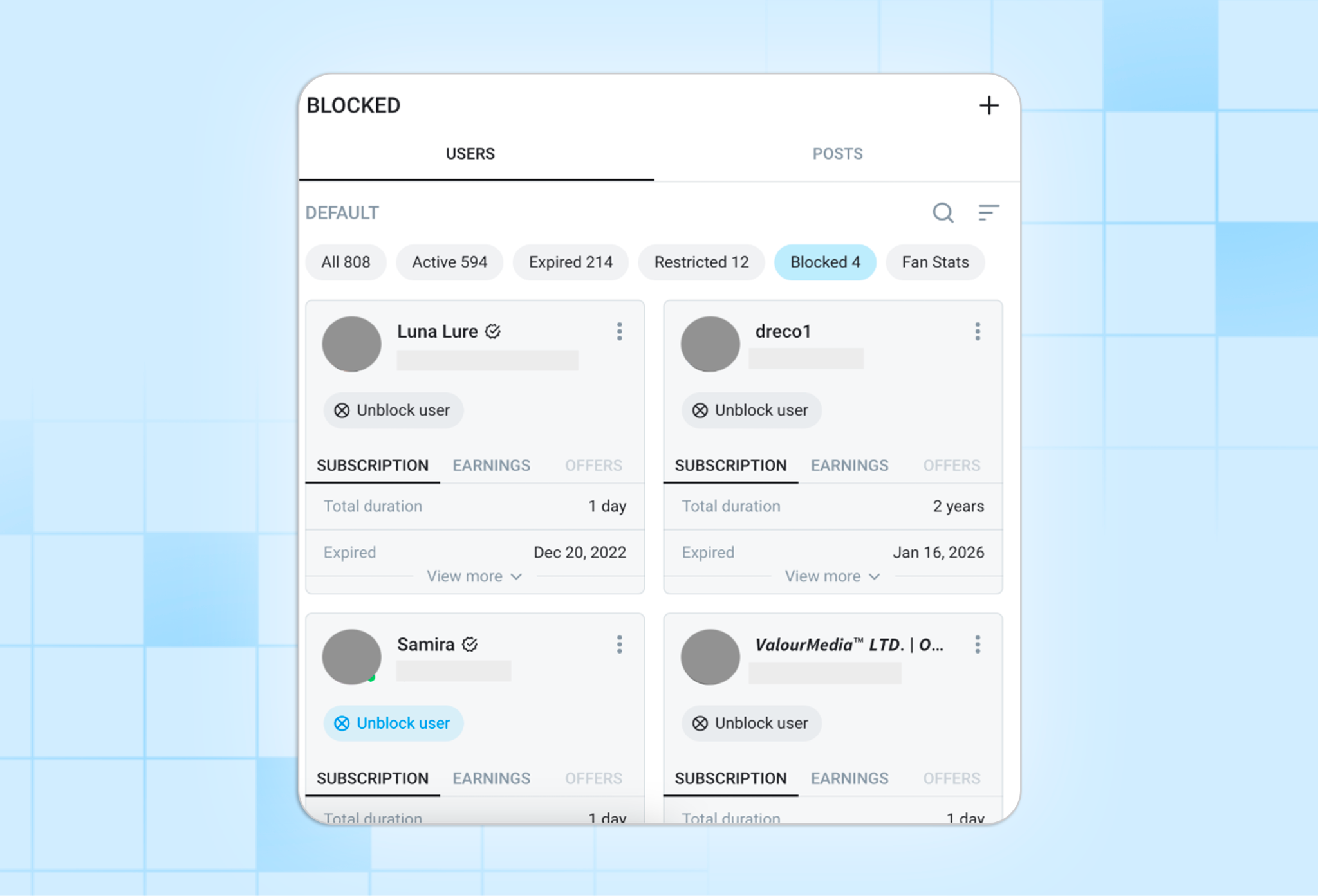
Blocking does more than kick someone off your page, so it helps to know how it actually works. On OnlyFans, a block sets a hard boundary: that person loses access to you and to your content.
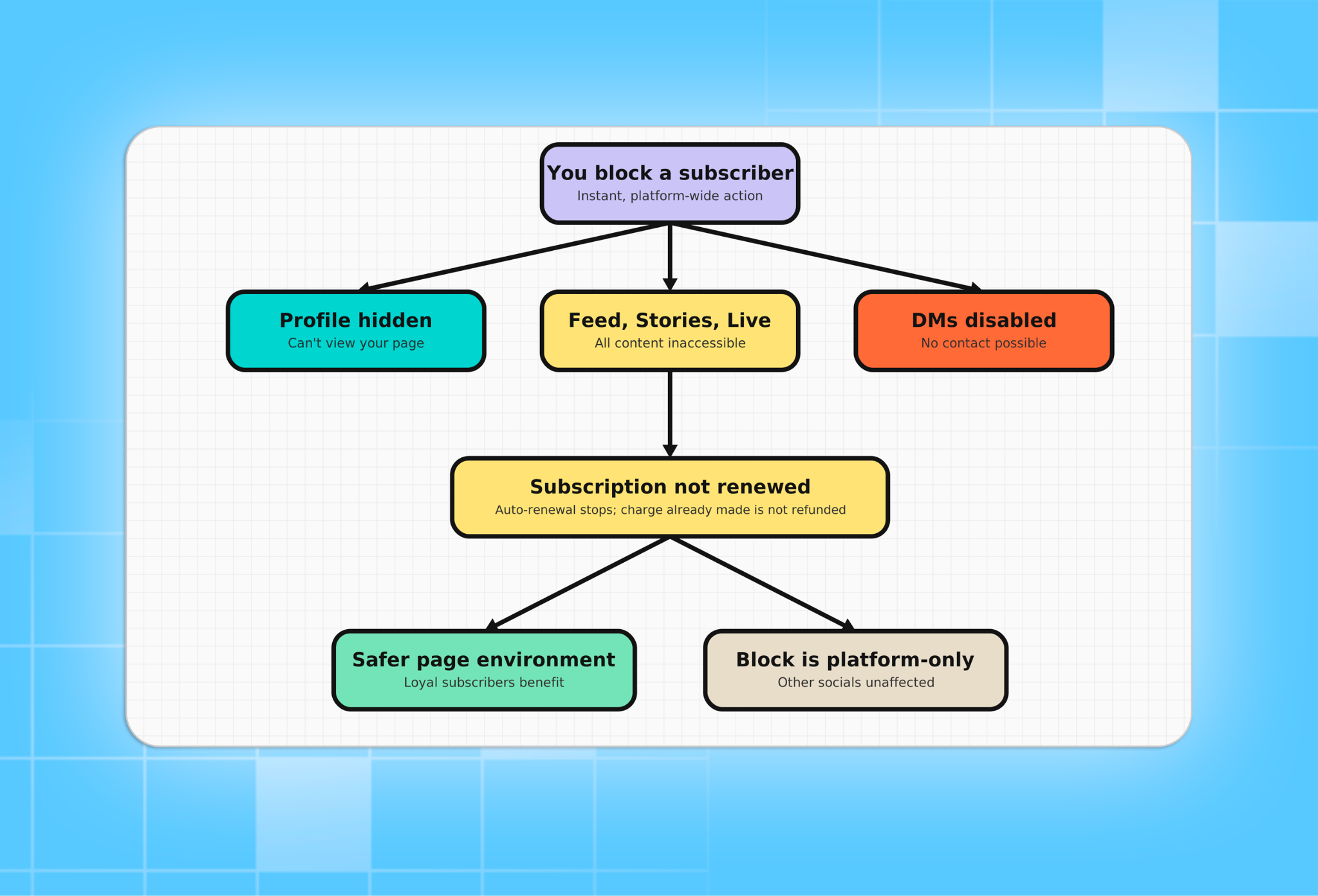
If you're planning on running an OnlyFans agency, make sure your models know exactly what happens when they block someone: The blocked user won't be able to see any of their existing or future content.
What Blocking Means for Creators and Agencies
When you block a user, the following happens immediately:
- They can no longer see your profile, feed, stories, or live streams.
- All direct messages between you are disabled.
- Their active subscription stops renewing automatically; any charges already processed are not refunded.
What blocking doesn't do: it won't hurt your reach. The algorithm looks at engagement from your active subscribers, so removing someone who never pays or who causes trouble doesn't count against you.
The one catch is that a block only covers OnlyFans. The same person can still find your public Instagram, TikTok, or Twitter, and if they show up there, you'll need to block them on each platform separately.
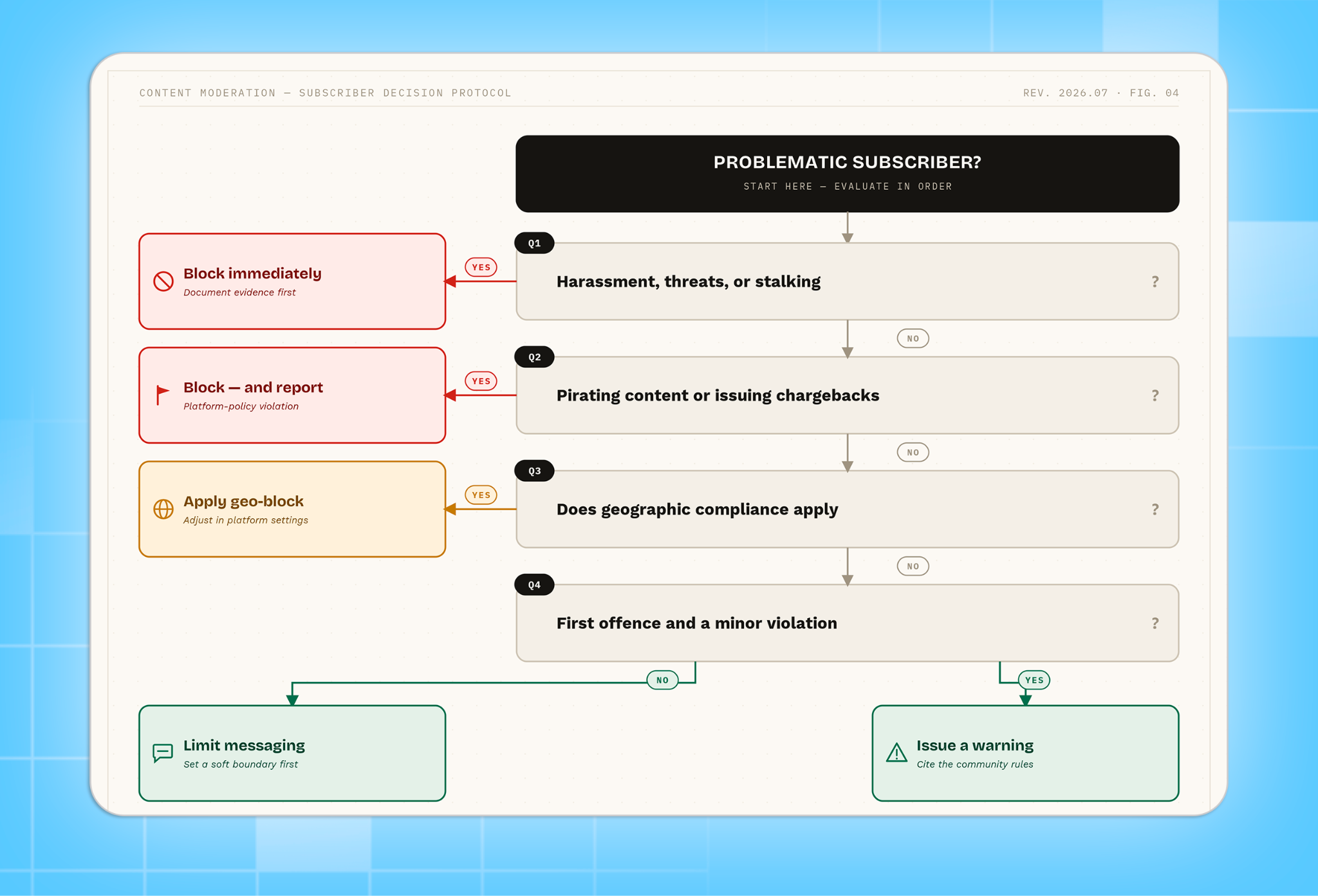
Blocking is a last resort for serious violations, not a first response to any friction. For minor issues, alternatives such as verbal boundaries, message limits, and formal warnings are more appropriate and preserve a potentially valuable subscriber relationship.
Some behaviors require an immediate block without warning:
- Direct threats, harassment, stalking, or sustained aggressive messaging
- Sharing, redistributing, or selling your content outside the platform (piracy)
- Filing a chargeback without first contacting you or platform support
- Coercive requests for free content paired with threats or manipulation
- Violations are serious enough to risk your account suspension
For anything below this threshold - first-time boundary violations, excessive messaging, minor inappropriate comments - follow the escalation ladder before blocking.
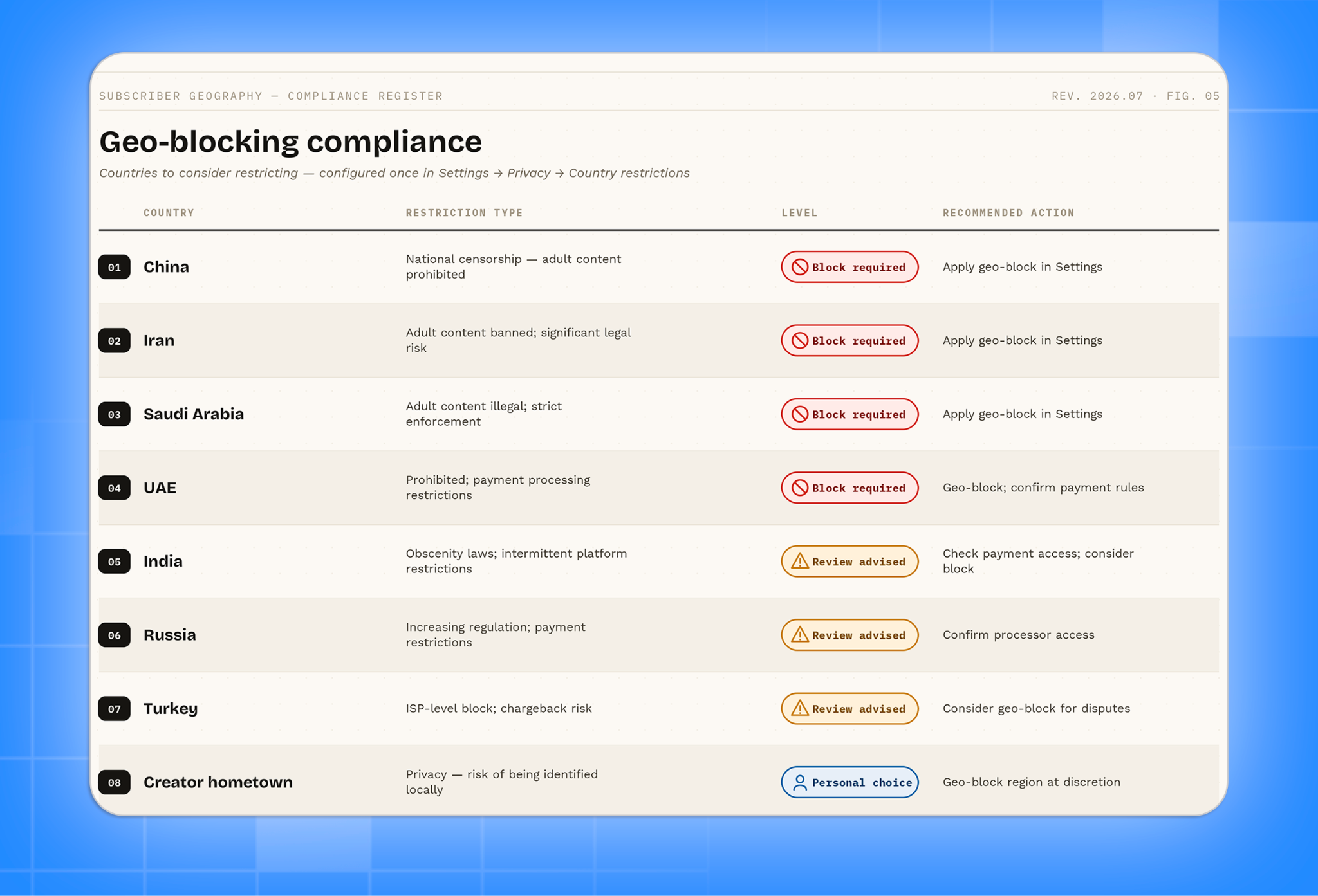
Compliance-based blocking (geo-blocking)
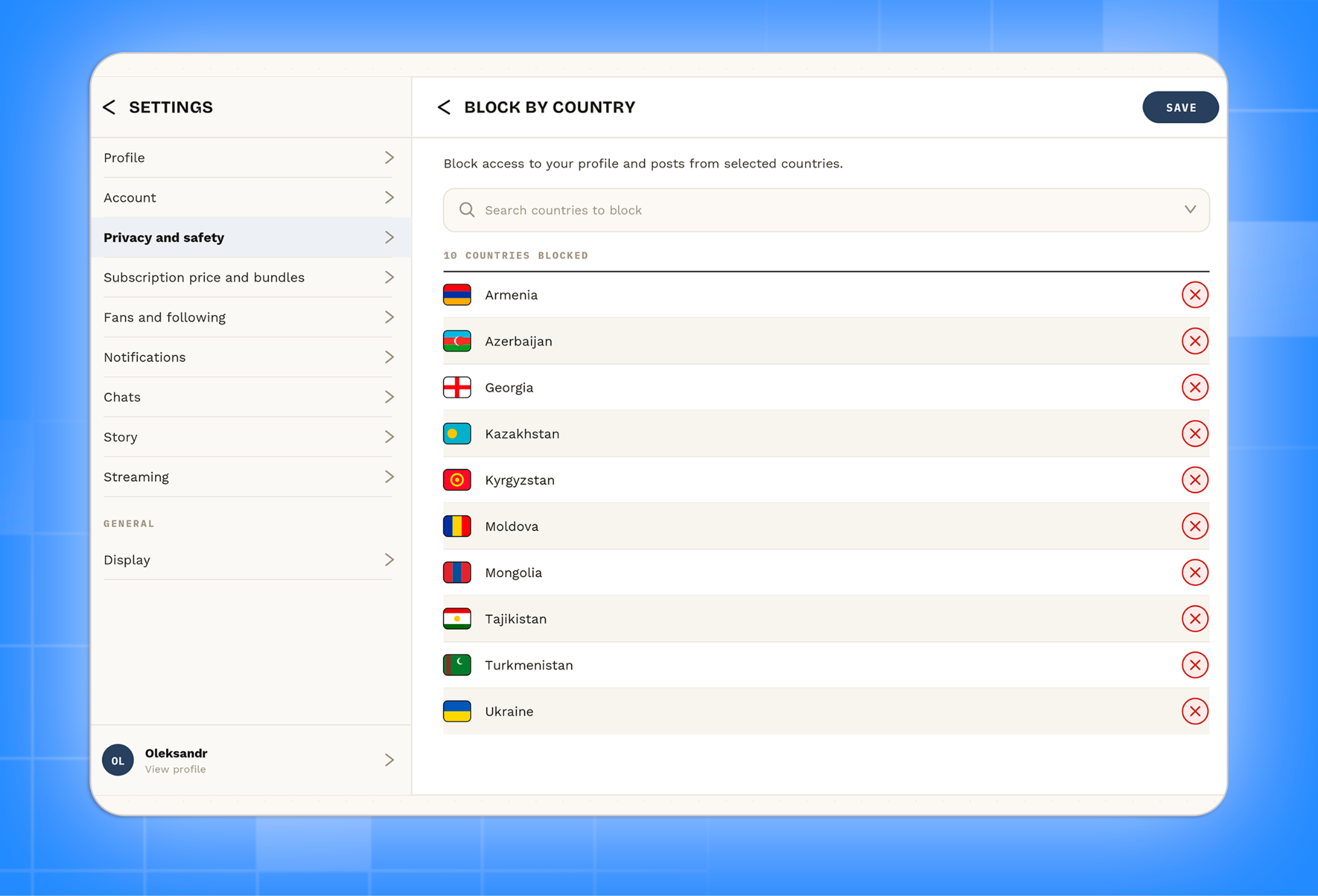
In some cases, blocking is not optional - it is a legal requirement. Many countries prohibit adult content outright or impose strict restrictions on payment processing. Geo-blocking restricts access to your content by geographic location without requiring individual manual blocks.
Geo-blocking is configured once in your platform settings (Settings > Privacy > Country restrictions) and applies automatically to all users from the selected regions. It does not count as a block against individual accounts and does not affect your subscriber metrics.
Creators who want to prevent being discovered by people they know in real life can also use geo-blocking to restrict access from their hometown, city, or country. This is a personal privacy decision, not a compliance requirement.
How to block manually - step by step
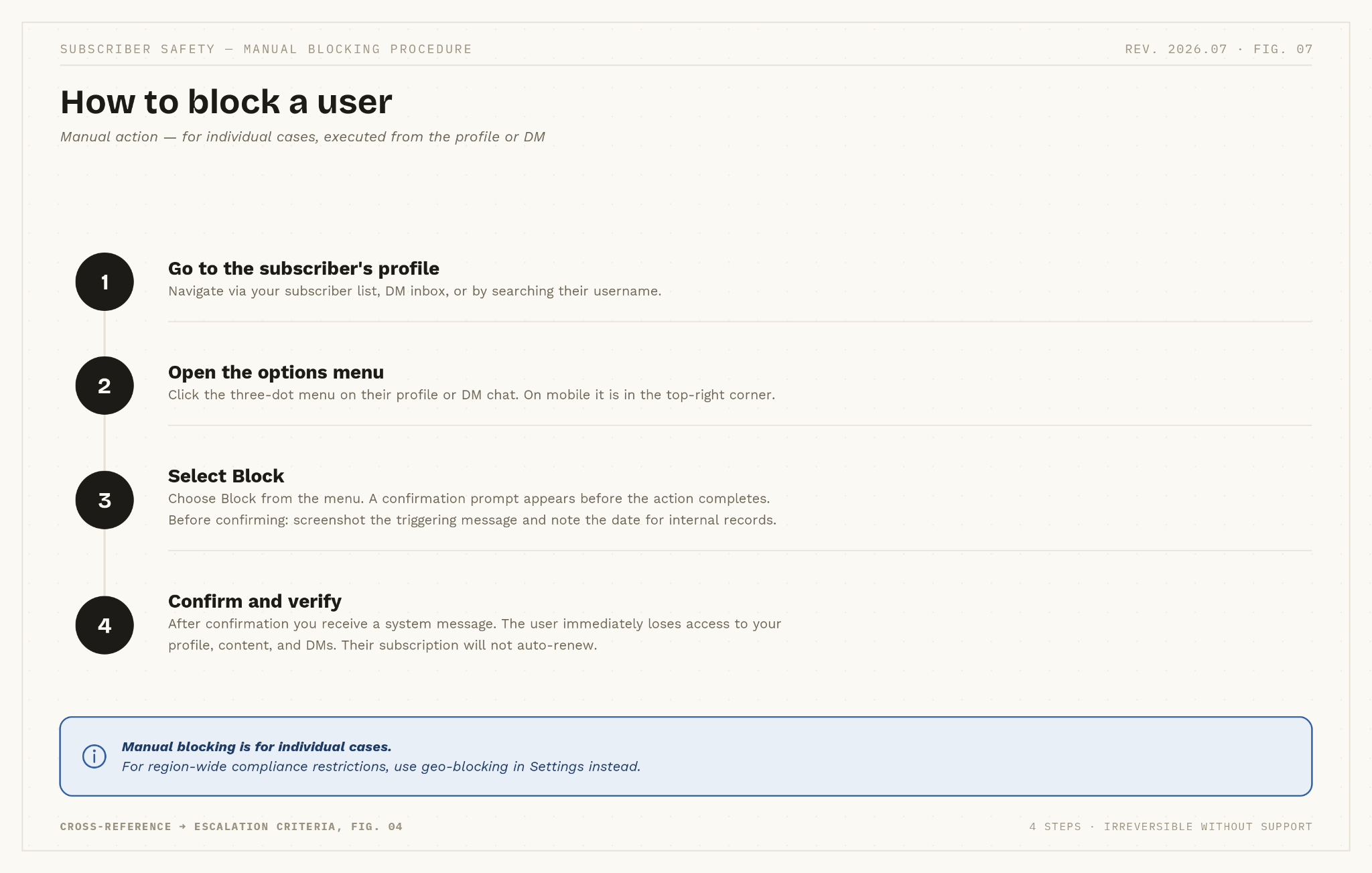
Manual blocking is for individual cases: a specific user whose behavior warrants immediate action. It is not a substitute for geo-blocking when a compliance-based restriction is needed.
Before blocking, take a screenshot of the message or comment that triggered the decision and note the date. This documentation is required if the block is reviewed internally or if you later need to report the user to the platform.
Managing blocking at agency scale
Agencies managing multiple creators face a specific challenge: a user blocked from one creator's page can simply subscribe to another. A shared blocklist and a written policy prevent this.
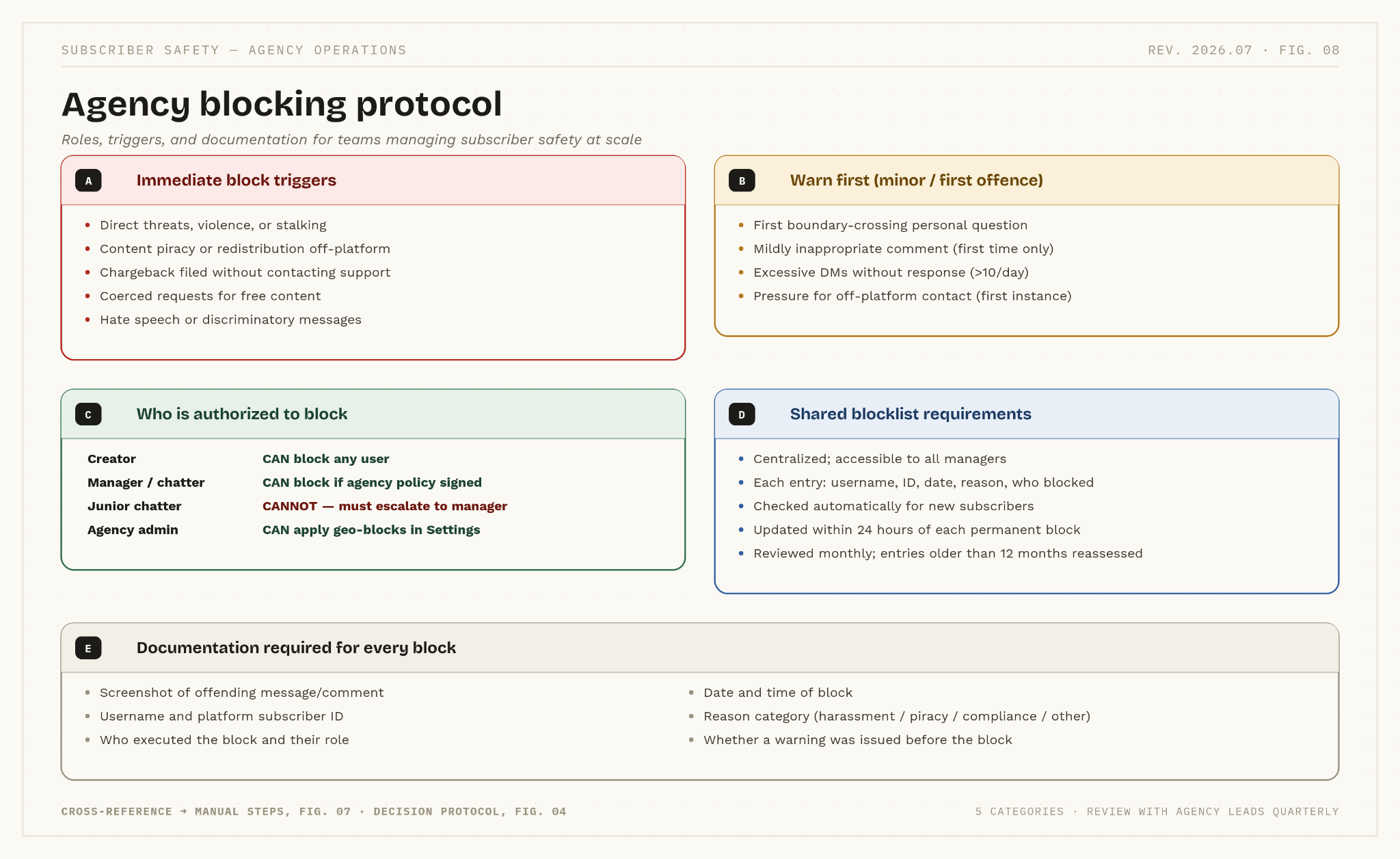
A functional agency blocking protocol requires three things:
A shared blocklist is maintained centrally and checked when any new subscriber joins any creator on the roster. Each entry should include the username, platform ID, date of block, reason category, and who executed the block.
Clearly defined authorization levels that specify who can block (the creator, a senior manager) and who must escalate (junior chatters, new staff). Ambiguity about who has authority leads to either under-enforcement or inconsistent blocks that cannot be justified later.
De-escalation training for chatters who handle DMs. The first response to a difficult subscriber should always be a scripted, calm, non-personal reply - not a block. Agencies should prepare ready-to-use responses for common scenarios: boundary-setting messages, final warnings citing community rules, and escalation templates for situations requiring a senior manager.
Alternatives to blocking
Blocking a paying subscriber is a permanent action with an immediate revenue cost. Before escalating to a block, work through the lower steps on the escalation ladder.
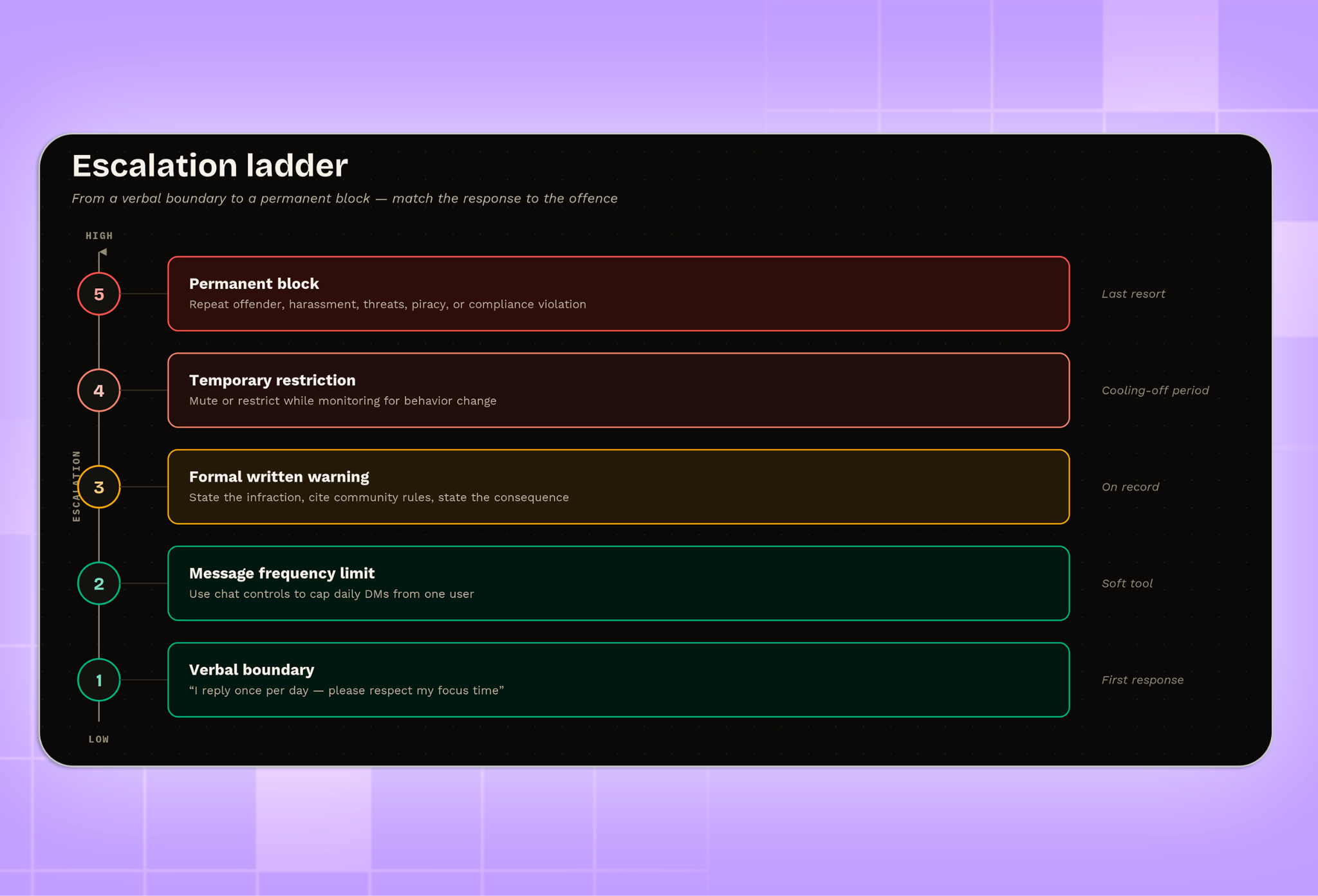
Verbal boundaries work for first-time offenders who may not realise they've overstepped. A direct, professional message - "I reply to one DM per day to keep my focus on content" or "Please keep questions to my work - I don't discuss personal topics" - resolves most boundary issues without any platform action.
Message frequency limits, where the platform allows them, cap how often a single user can contact you per day. This is effective for subscribers who message excessively but are not otherwise causing problems.
Formal written warnings are the appropriate step for a clear rule violation that falls short of a permanent ban. A warning message should: name the specific infraction, reference the community guideline it violates, and state the consequence - "any further violation will result in a permanent block." Keep a copy. If the user repeats the behavior, the documentation supports your block decision and any subsequent report to the platform.
How blocking affects your growth and earnings
| Metric | Engaged subscriber | Problematic subscriber |
|---|---|---|
| Monthly revenue | 10–30+ (tips, PPV, renewals) | 0–10 (often disputed or reversed) |
| Creator time per week | ~5 min (positive interactions only) | 1–3 hours (handling stress and harassment) |
| Chargeback risk | Very low (loyal, long-term) | High (can trigger account review) |
| Effect on page | Positive (encourages community growth) | Toxic (drives away good subscribers) |
| Content theft risk | Rare (values your work) | Likely (piracy, redistribution risk) |
A common concern for new creators is that blocking hurts growth. The reality is more nuanced. Losing the subscription payment is real - but so is the cost of keeping a problematic subscriber.
A creator handling a difficult subscriber spends one to three hours per week on stress management, repeat warnings, and documentation. That time is not spent creating content, engaging with loyal fans, or marketing. A single toxic subscriber who posts hostile comments can also affect the overall atmosphere of your page, reducing engagement and retention among the subscribers you most want to keep.
Blocking a genuinely disruptive user typically improves the quality of interactions on your page, which supports retention and tips from your existing subscriber base more reliably than keeping a low-value account active.
Protecting Identity and Personal Boundaries
Real privacy protection is a system, not a single setting. Treat it as five layers that all have to hold: your network (VPN, avoiding public or easily traced Wi-Fi), your device (a separate phone or browser profile used only for creator work), your content (scrubbed metadata, no recognizable landmarks, voice, or tattoos), your identity (a stage name paired with a dedicated email - ProtonMail is a common choice because it doesn’t require personal details to sign up), and your finances (a separate account or business entity for payouts).
Before you publish anything, review it for details that could tie back to you: your face if you’re not comfortable showing it, tattoos, mirrors, street signs, school or work logos, and even background audio. If you’ve already been posting without these precautions, audit what’s already up: run a reverse image search on your existing content, check old files for EXIF or location data, and look for any overlap between your creator accounts and your personal social media.
Downloaded OnlyFans content is watermarked by default, which won’t stop a determined leak but does make it traceable back to the account that shared it - useful if content resurfaces elsewhere. None of this replaces blocking a specific bad actor; it’s what keeps a block from being necessary in the first place, by making it harder for anyone to connect your content to your real identity.
Managing Problematic or Unsafe Subscribers
Some situations go beyond what an in-app block can address, and platform action alone won’t close the loop. If a subscriber’s behavior escalates into stalking, doxxing, or a direct threat, blocking them stops their access to your page, but it doesn’t create a record anywhere else. For anything at that level, contact OnlyFans support directly (not just the in-app report) with a written summary and the screenshots you’ve already documented - support tickets get more attention than a report button.
For threats or stalking, filing a police report is worth doing even if you don’t expect immediate action: it creates an official timestamp and paper trail that matters later, whether for a restraining order or a criminal case. In the US, the federal cyberstalking statute (18 U.S.C. § 2261A) covers electronic communications intended to cause substantial emotional distress or fear of injury - a useful reference point if you’re explaining the situation to local police who may not be familiar with platform-specific harassment. OnlyFans will comply with valid law enforcement requests for account information tied to an investigation, which is one more reason documentation should exist outside the platform, not just inside your own message history.
Geo-Blocking for Compliance and Safety
Geo-blocking isn’t just a settings toggle - the restrictions it’s built for vary a lot by country, and it helps to know which kind you’re dealing with. As of 2026, roughly 16 countries fully ban or heavily restrict OnlyFans, including China, Iran, Saudi Arabia, the UAE, Pakistan, Bangladesh, Belarus, and Afghanistan. But a “ban” isn’t always the same mechanism: some countries block the site entirely at the ISP level, others allow access but block the payment rails, and a few (India is the clearest example) restrict creators from the country without blocking subscribers.
Russia is a case worth knowing specifically: the site itself isn’t blocked, but payment processing is, so Russian subscribers can browse but can’t pay, and creators based there can’t receive payouts. Visa, Mastercard, and local banking partners ultimately decide whether a transaction clears, which means even in countries without a formal ban - India, Malaysia, and Nigeria are common examples - payments can still fail for reasons that have nothing to do with your account. If your subscriber base skews international, it’s worth checking your analytics for failed-payment patterns by region before assuming a low-conversion country is just uninterested.
Soft Boundaries and Controlled Messaging
Before you cap or cut off a fan, it helps to know what the platform’s messaging tools actually let you do. OnlyFans enforces a minimum delay of a couple of seconds between messages (you’ll see an “Allow 3 seconds” error if you send too fast), and mass-message campaigns can be paused, resumed, or unsent within 24 hours if you need to walk something back. You can run up to three mass-message campaigns at once, with anything beyond that queued automatically.
For controlling how a specific fan interacts with you, use targeting filters when segmenting your mass messages - by online status, subscription date, or total spend - rather than manually deciding who gets contacted. This gives you a middle ground between replying to everyone the same way and blocking them: you can quietly exclude a high-maintenance fan from certain campaigns, or route them into a lower-touch message tier, without any confrontation or formal warning.
Warning Strategies Before Permanent Blocks
A warning isn’t just a courtesy step before a block - it’s also the first piece of evidence in a longer chain, if things escalate further. If a subscriber’s violation involves your content being taken off-platform (screenshotted, redistributed, or sold elsewhere), the warning you send and the response you get become part of the record for a DMCA takedown. Under U.S. copyright law you own your content automatically the moment you post it, no registration required, so a takedown notice doesn’t depend on the warning - but a documented warning trail makes your case stronger if the same person disputes the takedown or if you escalate to a paid protection service.
Several services (Rulta, Ceartas, and similar) specialize in scanning for leaked content and filing takedowns on a creator’s behalf, which is worth knowing about before you need it rather than after. If you’d rather handle it yourself, a DMCA takedown is free to file and doesn’t require a lawyer - search engines and most hosting platforms have a standard submission form for it. Keep your warning messages and the infringing content together in one file; it’s the same documentation you’d hand to a takedown service or reference in a report to OnlyFans support.
FAQs
Does blocking a subscriber affect your account ranking or visibility?
No. Platform algorithms measure engagement rate among your active subscribers. Removing a subscriber who was not engaging positively does not reduce your rank and may improve your engagement ratio over time.
Can blocked users still see your social media profiles?
Yes. Blocking someone on OnlyFans only restricts their access on that platform. They can still find your public Instagram, TikTok, Twitter, or other profiles unless you block them there individually.
Should creators block users from their home country?
This is a personal privacy decision. Many professional creators use geo-blocking to prevent being discovered by people they know in real life. It is a legitimate use of the feature and does not affect your metrics.
Can agencies automate blocking?
Fully automated blocking based on behavioral criteria is not currently supported. However, agencies can use internal moderation tools to flag suspicious patterns for manual review. Compliance-based restrictions like geo-blocking are automated through platform settings. A shared blocklist with clear protocols comes closest to a systematic solution for agencies managing multiple creators.
Conclusion
Blocking is a professional tool, not a punitive measure. Used within a structured escalation policy - verbal boundaries first, formal warnings next, blocks for serious or repeat violations - it protects the creator, maintains the quality of the subscriber community, and reduces the time spent managing difficult interactions.
For agencies, a written protocol with clear authorization levels and a shared blocklist is the operational foundation. For individual creators, the rule is simple: document before you block, exhaust alternatives for minor violations, and act immediately for harassment, piracy, or compliance requirements.
Related insights
Compare your options
Browse agency rankings or compare tools for creator teams.